Faded Slide Restoration
Bring back blue skies and natural skin on an old slide gone magenta-red, cropped out of its mount — for a family slide worth printing.
Restore the colours of this faded colour slide. Show only the picture inside the slide mount, cropped exactly to the edges of the mount's window, with no mount, border, lightbox or handwriting. Keep the same framing as that window: do not zoom out, extend the scene or add anything. Remove the magenta-red colour cast so skin tones look natural, bring back the blue of the sky and the sea and the true colours of the clothes and the beach hut, and recover detail in the muddy shadows and washed-out highlights. Remove the dust specks and the thin scratch. Keep everyone's exact facial features, expressions and pose unchanged; do not invent or alter faces. Keep the look and grain of 1960s slide film rather than a modern digital photo. No text anywhere in the image.
How to use it
Only edit photos you have permission to use, including permission from the people pictured.
- Keep an untouched copy and upload the best available scan, including damaged edges you want repaired.
- Attach the source in an AI image editor compatible with this prompt (Gemini · ChatGPT (any AI image editor)), then paste the prompt. Request the correction described below without adding new clothes, expressions, or a replacement setting.
- Compare faces, clothing, and background details with the original. If new detail is invented, reduce the enhancement request; keep the original alongside the edit.
- Save the accepted image separately from the original and label it as AI-edited when sharing. Use the saved edit as the source if you choose to animate it next.
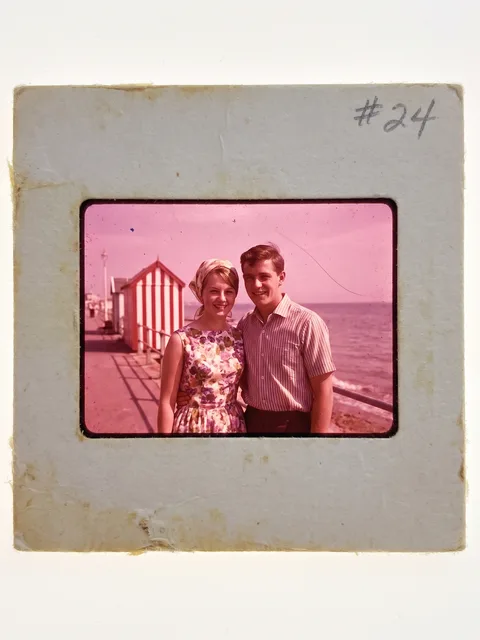
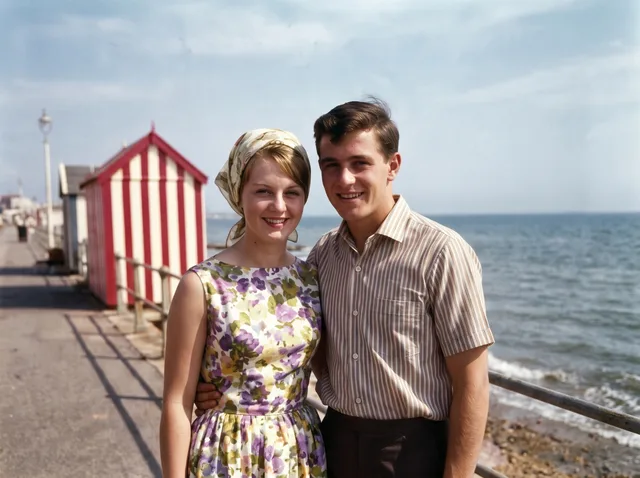
What happened when we tested it
One run, on an AI-made 1960s seaside slide of fictional people with a heavy magenta-red cast, dust specks and a hair-thin scratch. The colour came back convincingly: a blue sky and sea, natural skin, the floral dress in purples and greens, and it still looks like slide film rather than a phone photo. The dust and the scratch are gone, and the cardboard mount with its pencilled '#24' was cropped away as asked. What it got wrong is the framing: despite 'do not zoom out', the result is slightly wider than the slide window, with more sky and promenade and the couple a little smaller and further right. We generated it at 4:3 to match the slide's shape, so set your tool to landscape. The prompt names our slide's beach hut and sea, so swap those words for what is in yours. And the colours are a reconstruction: the model cannot know what the dress really looked like, only what is plausible.