Vintage Film Look: AI Prompts for 90s / Y2K / Analog Photos
Film photos feel different because film behaves differently: grain instead of noise, highlights that bloom and halate instead of clipping, colors that shift warm or green depending on the stock, and the merciless honesty of a direct flash. Modern AI editing can reproduce all of it from a plain phone photo — if you prompt for the physics, not just the vibe.
“Make it look vintage” gets you a brown Instagram filter. Naming the actual artifacts — grain, halation, flash falloff, color shifts — gets you something people will ask about. Here are the recipes.
The Ingredients of a Film Look
Four things do most of the work:
Grain — organic texture, stronger in shadows, never uniform. Halation — the soft red-orange glow that bleeds around bright lights on film. Flash — the on-camera flash look: bright flat subject, fast falloff into darkness. Color character — each film era has a palette: warm and golden, green-shifted, or the cool oversharp look of early digital.
Every prompt below combines these in different ratios. Use a clear photo of yourself and, as with all edits, keep it to your own photos or people who’ve said yes — and label AI edits when you share them.
Recipe 1: 90s Point-and-Shoot
The disposable-camera party look — flash, grain, and zero pretension.
Make this photo look like it was taken on a 90s point-and-shoot film
camera with direct flash: slightly overexposed subject, dark background
falloff, visible film grain, warm color cast, soft focus edges, subtle
date stamp in orange in the bottom corner. Keep my exact facial features,
do not change my face.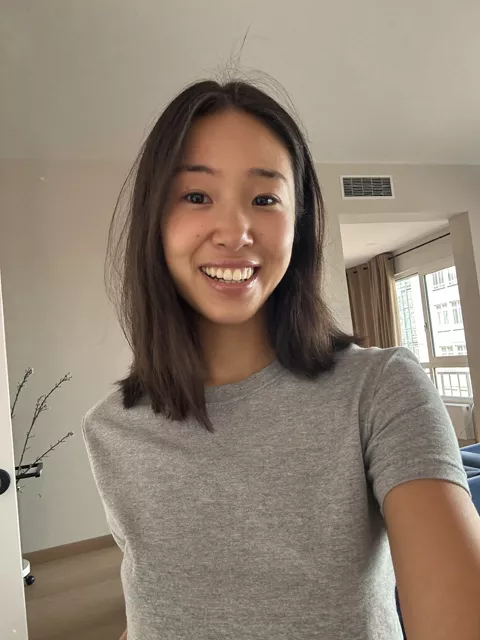
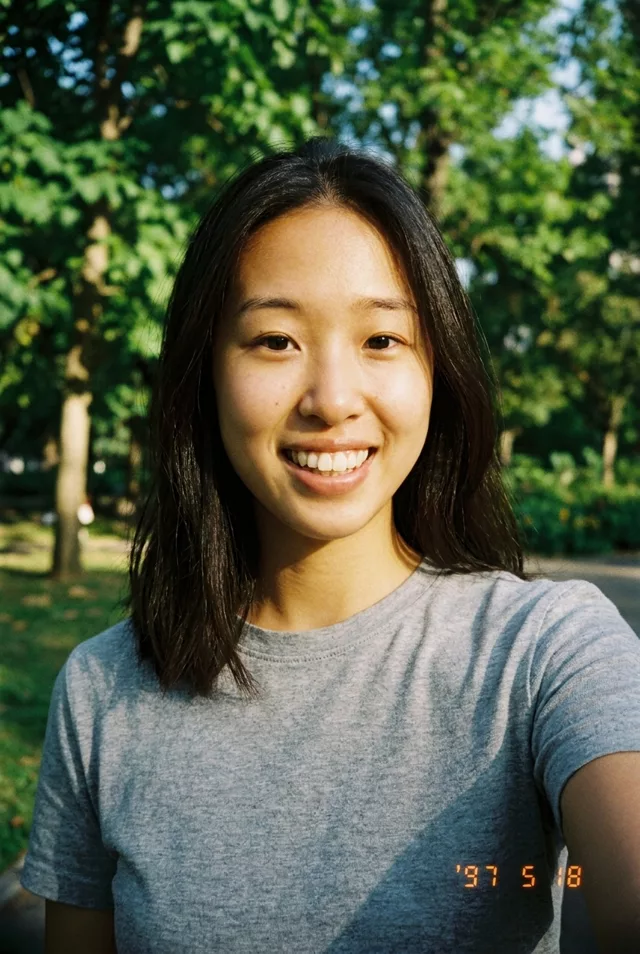
The orange date stamp is the detail that sells it. If the model garbles the digits, ask for a specific short date like “03 08 97”.
Recipe 2: Y2K Digicam
Not film — early consumer digital, which is its own aesthetic now: harsh flash, slightly cool colors, that crunchy low-resolution sharpness.
Edit this photo to look like it was shot on an early-2000s compact
digital camera with flash: cool slightly bluish color cast, harsh
on-camera flash, mild digital noise, slightly oversharpened details,
low dynamic range with blown highlights. Keep my exact facial features,
do not change my face.
This one pairs perfectly with Y2K outfits and interiors — add “in a room with early 2000s decor” if you want the full time capsule.
Recipe 3: Golden-Hour Analog
The soft, warm 35mm look — think summer photos from a family album.
Transform this photo into a warm analog 35mm film photograph: golden
hour sunlight, fine film grain, gentle halation glow around highlights,
slightly faded blacks, warm green-gold color palette, soft natural
contrast. Keep my exact facial features, do not change my face.
“Slightly faded blacks” is the quiet hero here — lifted shadows are what separates film from a warm digital filter.
Recipe 4: Moody Cinematic Night
Film look after dark: neon, halation, and heavy atmosphere.
Make this photo look like a night scene shot on cinema film: neon signs
and street lights with strong halation glow, deep grain in the shadows,
teal and amber color grade, slight motion softness, atmospheric haze.
Keep my exact facial features, do not change my face.
Do / Don’t
- Do name specific artifacts (grain, halation, flash falloff) instead of just “vintage.”
- Do add one era anchor — a date stamp, a decor detail, an outfit — for instant believability.
- Do keep the identity clause in every prompt; heavy grain and soft focus are notorious for melting likeness.
- Do regenerate rather than over-edit; film looks are very run-to-run variable.
- Don’t stack every effect at once — flash and golden hour and haze reads as confused, because no real camera does all three.
- Don’t crank the grain; real film grain is felt, not seen first.
- Don’t say “old photo” if you don’t want damage — models may add scratches and tears you didn’t ask for.
- Don’t forget your originals; save both versions.
Want to mix your own stock? The prompt generator lets you pick an era, flash style, and color character and assembles the prompt for you — and the prompt library has more film recipes, including black-and-white and expired-film variants.
FAQ
Should I name a real film stock in the prompt? You can — models recognize the look of famous stocks reasonably well. But describing the traits (“warm, fine grain, soft saturated greens”) gives you more control than a name and works across every tool.
Why does my face change more with film looks than other styles? Grain and soft focus remove the fine detail the model uses to keep your likeness. Use a sharp source photo, keep the preservation clause, and lower grain intensity if drift persists — the fixes in our identity-drift guide all apply.
Can I animate these afterward? Yes, and it looks great — a film-look photo with subtle motion reads like found footage. Ask the video tool to “preserve the film grain and color grade” so the animation doesn’t clean up your carefully-added imperfections.